Tuesday, November 10, 2020

Avast Internet Security Software Review

Best for firewall security

4/5
  • Protection from online threats
  • Sandbox for testing suspicious files
  • Password manager
  • Light impact on your computer

Avast Internet Security at a Glance

Avast Internet Security is an antivirus suite designed to protect your PC from malware, ransomware, adware, and other threats to your hard drive. The program works using artificial intelligence (AI) technology to recognize specific software signatures and behavior patterns of dangerous programs and files. When an unsafe item is detected, it is placed in the “Virus Chest,” a quarantine area safe from the rest of your computer. From the Virus Chest, you can choose to either mark a program or file as safe or have Avast remove it from your computer.

Avast Internet Security

Avast Internet Security’s additional features go beyond basic protection from viruses to extend your security to your online experience. Its email shield works with your email program to keep you from accidentally sending or downloading malware. The browser extension makes sure you’re not landing on any potentially dangerous websites. You can even create your own secure browser to keep you safe during internet banking and shopping.

2019 data breach

In December 2019, Avast collected unnecessary user data such as browsing history and activity through Avast subsidiary Jumpshot. Its privacy policy defends storing user data since it’s anonymized, but the company offered no clear policy on length of data retention.

Avast has since severed ties with Jumpshot, though we still hesitate to recommend the software.

Pricing and Features

Price Check Price
Malware Protection Yes
Protection against Unsafe Links and Downloads Yes
Performance Issue Scan Yes
Real-Time Security Updates Yes
Extra Ransomware Protection Yes
Enhanced Firewall Yes
Fake Website Protection Yes
Browser Cleanup Yes
Sandbox Yes
Game Mode Yes
Wi-Fi Protection Yes
Password Protection Yes
Webcam Hacking Protection No
Mobile Device Protection No
Parental Controls No

Pros

  • Free Trial
    Avast offers a free thirty-day trial of the Internet Security software so you can try before you buy.
  • Money-Back Guarantee
    If you do purchase the software and you’re not happy with it, Avast offers a thirty-day money-back guarantee.
  • Automatic Renewal
    Automatic renewal isn’t always a good thing, but antivirus software is like health insurance: you don’t want to be caught without it. Avast’s yearly auto-renewal ensures there’s no lapse in protection for your PC, but you can also opt out at any time.
  • Coverage for Additional Devices
    Avast will let you increase your Internet Security subscription to include additional devices as needed, but there is an additional charge.

Cons

  • No Phone Protection
    Avast doesn’t offer mobile device protection with the Internet Security suite, but you can go online and download a version of Avast Free Antivirus to protect your Android device.
  • No Parental Controls
    Most antivirus software suites include settings to prevent kids from accessing inappropriate content online, but you’ll have to purchase a pricier package if you want this service from Avast.
  • No Data Shredder
    At this price point, we’d hope to see a data shredder included with the package, but like the parental controls, you’ll have to pay for an upgrade to get this feature.

Features and Usability

Avast has several additional features that go above and beyond a standard antivirus program. While some are useful—like the Sandbox and Browser Cleanup—others, like SafePrice, have little to do with security and can be annoying.

Pros

  • Firewall
    While many other antivirus software firewalls work by either allowing nothing in or nothing out, the Avast firewall uses a more sophisticated system of rules that allow it to decide what passes through. This is a smarter approach that still provides top-notch protection.
  • Sandbox
    Avast’s Sandbox feature allows you to test out new software in a separate, protected space on your computer before it interacts with the rest of your hard drive, so you can make sure it’s safe.
  • Wi-Fi Protection
    If you’ve ever worried about strangers using your wireless network, Avast’s Wi-Fi protection will stop them in their tracks, and it monitors for hackers on hardwire networks as well.
  • Anti-Spam Filter
    Most email providers offer spam filters as part of their services, but few offer customization options like the ones available through Avast. With Avast, you can adjust the strength of the filter and automatically whitelist email addresses you send mail to.

Cons

  • Pop-Ups
    If you’re not careful during installation, you might end up with a lot of Avast pop-ups for additional features like Software Updater and SafePrice. Fortunately, you can disable most of these by either clicking “customize” before installation begins or by going to the Preferences tab in the program. Putting Avast in Game Mode can also solve the problem.

Download and Installation

Downloading Avast is pretty straightforward. We did find a few glitches with installation, but they’re easily fixed.

Pros

  • Fast Download and Installation
    Avast is quick to download, and most users find it easy to install.

Cons

  • Confusing Setup
    Several customers complain that even though they bought a one- or two-year license for the program, their installation screen shows that they only have a thirty-day license. We looked into this issue and learned that you need to enter your product code into the program in order for it to update the license.

Protection and Performance

Avast has one of the lightest touches on the market when it comes to quietly doing its job without interfering with your computer experience, but its scans may run longer than expected.

Pros

  • Cyber Capture
    If Avast catches any suspicious threats that it doesn’t recognize, it sends them to its virus lab in the cloud for analysis. If the lab identifies one of these threats as malware, it notifies all Avast users. Not only does this keep your antivirus software current, it also adds more layers of protection.
  • Light Impact
    Your computer will still run at normal speeds, even while running the Avast antivirus software.
  • High Test Scores
    Avast blocked 99.6% of malware with only one false positive, and it blocked 100% of malware encountered online—this is according to tests from April 2018, run by the independent testing organization AV Comparatives. It received three out of three stars and an Advanced+ rating for both protection and performance.

Cons

  • Longer Scans
    The only downside to Avast’s light touch on PCs is its longer scan times. Expect the scans to run longer than some competitors.
  • 2019 Data Breach
    In December 2019, Avast collected user data such as browsing history and activity through its subsidiary Jumpshot. Its privacy policy defends anonymous storage of user data, but the company offered no clear policy on length of data retention. Avast has since severed ties with Jumpshot.

FAQs

What is a VPN?

A VPN (virtual private network) encrypts your connection, allowing you to be completely anonymous whenever you connect to any device. This keeps you safe from advertisers and others who try to track your online activities, and it also gives you added protection when using public Wi-Fi.

Does the Avast Internet Security suite include VPN protection?

No, but you can purchase it as an add-on to the Internet Security package by buying Avast SecureLine VPN.

What is SafePrice?

SafePrice is a deal alert feature that automatically installs on your browser when you set up Avast Internet Security. When Avast notices you shopping online, it will automatically start to search for a better deal for you. If you want to remove this feature, you can disable it under Preferences without affecting Avast’s protective features.

Does Avast Internet Security include password protection?

Yes, Avast includes a password manager that allows you to create a single secure password for all of your accounts, but its features are limited. For additional features like one-touch login and Password Guardian, you can upgrade to a more robust Avast Passwords Premium for an additional fee.

The Bottom Line

We hesitate to recommend it after its data breach near the end of 2019, but Avast Internet Security is an option for those who want to go beyond free antivirus programs and add the protection of a robust firewall and online security features.

Its simple download, user-friendly interface, and light impact make it low-key enough for anyone to use, but its SafeZone browser and Sandbox features open up additional possibilities for the more adventurous.

Pros

  • Excellent malware protection
  • Minimal impact
  • Thirty-day guarantee
  • Tough firewall
  • Secure browser

Cons

  • No parental controls
  • Pop-ups
  • Lengthy scans
  • Known data breach

How We Evaluated Avast Internet Security

To write our Avast software review, we studied Avast’s independent test scores, read numerous online reviews from a variety of sources, and tried Avast’s software for ourselves. To learn more about how we review products, check out our methodology.

The post Avast Internet Security Software Review appeared first on SafeWise.


Aricle source here: Avast Internet Security Software Review

Monday, November 9, 2020

Merkury Smart WiFi Camera Review

Merkury Smart WiFi Camera

Merkury Smart WiFi Camera

3.5/5
  • Good option for the price
  • Supports multiple voice assistants

Bottom line: Above average

The Merkury Smart WiFi Camera is a pleasant surprise as far as cheap security cameras go. It won’t turn heads with features but is a decent security camera that fits into a respectable smart home ecosystem. Merkury Smart WiFi Camera doesn’t have cloud video storage, which is probably a deal-breaker for most folks. Still, it’s not bad for a home security camera that costs less than $40.

Pros

  • Good option for the price
  • Mobile app controls
  • Flexible stand
  • Supports multiple voice assistants
  • Smart home device variety

Cons

  • No cloud storage
  • No microSD card included
  • No 5GHz Wi-Fi network support
  • Occasional Wi-Fi connection problems

What’s in the box

Merkury Smart WiFi Camera
  • Merkury Smart WiFi Camera
  • USB cable
  • Power adapter
  • Mounting adhesive
  • User manual

How we reviewed

We have years of experience reviewing security cameras, so we approached the Merkury Smart WiFi Camera with several goals. Specifically, we researched the camera’s technology, installation, and customer support options. We also looked at customer reviews to balance our perspective with real-world performance.

Learn more about our review process in our methodology.

Tech and equipment

Average video quality

As far as technology goes, the Merkury Smart WiFi Camera isn’t too complicated compared with other cameras under $40. It boasts 1080p video resolution, which provides enough detail for most folks without chewing through storage space and internet bandwidth too quickly.

The resolution works well with Merkury’s 115ยบ field of view, which shows a clear view of a room, especially if you install the camera in a corner. The infrared night vision on this wireless security camera works well and nearly matches daytime videos’ clarity—similar to competitors like Wyze and Eufy.

Weak recording storage

The biggest weakness of the Merkury Smart WiFi Camera is that it doesn’t offer cloud storage. Instead, you have the option to take screenshots and download short clips from live video feeds. For all other video storage needs, you must have a microSD card.

The good news is that this IP camera supports cards up to 128GB, which can last for months before it starts to overwrite old recordings. Merkury says the camera generally uses about 1GB per day, so even a smaller card is sufficient for long-term storage when the camera records with motion detection.

The bad news is that it doesn’t come with a microSD card in the box. So you’ll need to spend an extra $10–$25 on a card for your camera, diluting its affordability. Most competitors don’t include microSD cards either, so this is more of a general gripe than a real drawback.

Plentiful smart home options

We didn’t have much experience with Merkury Innovations before this review, but it was surprising how much smart home equipment the brand sells.

There are 19 smart home devices in the lineup (16 cost less than $40), including smart lighting, smart plugs, video doorbells, security cameras, and entry sensors.

In general, we found favorable customer reviews for these products—they’re cheap enough to try out in your smart home but easy to return if you don’t like the results.

Each smart device (including the Merkury Smart Camera) connects to Wi-Fi and uses the Geeni app. They even work with voice assistants like Amazon Alexa, Google Assistant,* and Microsoft Cortana.

While we like the Cortana compatibility since there aren’t many smart home devices that support it, it’s not as useful as Alexa and Google Assistant.

Easy Wi-Fi setup

Like most security cameras, this unit connects to your home Wi-Fi network, so you can control it from your smartphone using the Geeni app (Geeni is a sibling brand to Merkury Innovations).

The app has a straightforward layout that’s easy to use for live viewing your camera feed, watching recordings, or talking with people using the Merkury Smart WiFi Camera’s two-way audio.

Installation

How do I set up my Merkury Smart WiFi Camera?

  1. Connect the camera, USB cable, and power adapter before plugging it in.
  2. Use the Geeni app (iOS and Google Play) to connect the camera to your Wi-Fi network.
  3. Adjust the settings, link to a voice assistant, and insert a memory card as needed.

You can place the camera on any flat surface or attach it to a wall with the included adhesive pad. We like that the camera’s bendable stand allows you to point the lens at a particular vista like an entrance or pricey home theater setup.

Unfortunately, this camera doesn’t support 5GHz Wi-Fi networks, so you may need to adjust your phone’s settings to 2.4GHz during the setup process if you’re struggling to connect to the camera.

We also found some user reviews that note occasional Wi-Fi problems like dropped connections and laggy video. But these issues don’t seem to affect most folks.

Customer service

On the surface, Merkury Innovations doesn’t offer a ton in terms of customer service. The manual lists a phone number, and the main website has an email form for getting assistance, but you have to dig deeper for additional support options.

For example, the manual directs users to the support site for Geeni cameras, which adds live chat support to the list. But this is more helpful for the Geeni app than this specific smart security camera. You can also access basic support through the Geeni app.

As we read critical user reviews on retail sites like Walmart and Geeni’s social media pages, we often saw the company following up to offer more assistance. So we’re hopeful that the company pays attention to customer feedback and works to fix problems.

Overall, Merkury Innovations’ customer service isn’t as seamless as interacting with Wyze, Arlo, and Ring—but it’s still very responsive and helpful.

How Merkury compares with other cameras under $40

Price†
Cloud storage
Resolution
Field of view
Smart home compatibility
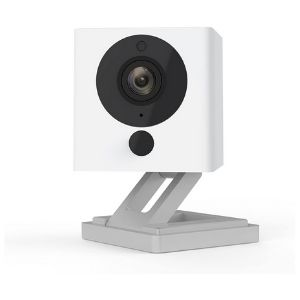
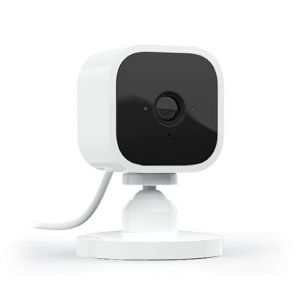
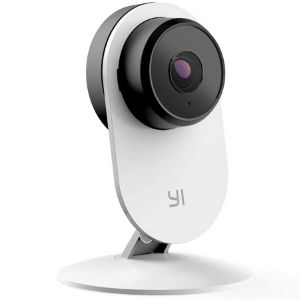
Merkury Smart WiFi Camera Wyze Cam Blink Mini Yi Home Camera 3 Eufy Security Indoor Cam 2K
Merkury Smart WiFi Camera Wyze Cam V2 Blink Mini camera Yi Home Camera 3 Eufy Security Indoor Cam 2K
$27.88 $25.98 $34.99 $25.99 $39.99
None Starts at $0.00/mo. Starts at $3.00/mo. Starts at $0.00/mo. Starts at $2.99/mo.
1080p 1080p 1080p 1080p 1440p (2K)
115ยบ 110ยบ 110ยบ 107ยบ 125ยบ
Amazon Alexa
Google Assistant
Microsoft Cortana
Amazon Alexa
Google Assistant
Amazon Alexa Amazon Alexa Amazon Alexa
Apple HomeKit
Google Assistant
View on Walmart View on Amazon View on Amazon View on Amazon View on Amazon
Read review Read review Read review

†Amazon.com list price as of 11/06/2020 at 11:30 a.m. (MT). Read full disclaimer.

Final word

We were skeptical when we started researching the Merkury Smart WiFi Camera for this review, but we were pleasantly surprised by this nifty little camera.

While its specs are mostly average and won’t outshine Wyze, Merkury’s biggest strength is its posse of affordable smart home devices. Check out our guide to cheap security cameras for our top picks to watch over your home on a budget.

Merkury Smart WiFi Camera FAQ

Does Merkury Smart WiFi Camera record?

Merkury Smart WiFi Camera records to a microSD card (sold separately)—it supports cards up to 128GB.

Is Merkury Innovations a good brand?

Based on our research, we think that Merkury Innovations puts a lot of effort into its products and customer service, making it fairly reliable. Though it’s not at the same level as top brands like Arlo and Wyze, it holds its own.

Related articles

Disclaimers

*Google, Google Assistant, and other related marks are trademarks of Google LLC.

†Amazon.com list price as of 11/06/2020 at 11:30 a.m. (MT). Product prices and availability are accurate as of the date/time indicated and are subject to change. Any price and availability information displayed on Amazon at the time of purchase will apply to the purchase of this product. Safewise.com utilizes paid Amazon links.

Certain content that appears on this site comes from Amazon. This content is provided “as is” and is subject to change or removal at any time.

The post Merkury Smart WiFi Camera Review appeared first on SafeWise.


Aricle source here: Merkury Smart WiFi Camera Review

Your Black Friday & Cyber Monday Shopping Guide to Smart Home Tech

Calendar Icon
Last Updated: Today
Black Friday is going to look a little different this year due to the coronavirus pandemic, but the good news is that many of the big box stores have deals available right now. Check out our gift guides and buyers guides below to find the latest deals for smart home gadgets, home security cameras and more.

Popular retailers like WalmartTarget, Best Buy, Kohl’s , Lowe’s and Home Depot have some of the best deals of the year during the holidays. 

To make your Black Friday and Cyber Monday about shopping (instead of researching), we round up the best deals on some of our favorite smart home and home security devices, as well as other popular electronics. Our recommendations help you finalize your holiday shopping list and make the most of all of the holiday deals.

Black Friday and Cyber Monday FAQs

When is Black Friday?

Black Friday takes place every year on the day after Thanksgiving and marks the unofficial start of the holiday shopping season. In 2019, it fell on November 29. But many stores begin sales (both online and in-store) in the days and weeks leading up to the famous shopping day. Some even open for in-store deals on Thanksgiving day. 

How does Black Friday work?

Not long ago, shopping on Black Friday involved waiting (and risking injury) amongst crowds of people for retailers’ doors to open before the sun rose. Today, it’s not uncommon for stores to open at midnight on Friday or in the afternoon or evening hours of Thanksgiving. 

If you’d rather not skip Thanksgiving dinner to score a steep discount, there’s no need to give up your turkey. Several pre-Black Friday deals make their debut throughout the month of November—and most of the best discounts and promotions will be offered in stores and online in the week leading up to Black Friday. 

How do you shop on Black Friday?

To maximize your Black Friday shopping experience you need to create a plan and a budget—and stick to it. Make a shopping list and check it twice to avoid splurging on extras that will burst your budget.

Once you have a finalized list, start scouting for sales on the products you want and compare prices among retailers. Checking sites like SafeWise can help you stay in the loop as stores release more information about Black Friday promotions.  

Some retailers require shoppers to come into the store for the best Black Friday deals, but you can also score great deals online. 

What stores have the best deals on Black Friday?

The sheer volume of promotions, discounts, product bundles, and freebies that stores advertise in the lead up to Black Friday can make it difficult to determine which offers are actually worth your time. We carefully evaluate offers on popular products to help you separate the meat from the giblets. 

What is a doorbuster?

A doorbuster is a special deal or discounted price that’s offered for a limited time on a popular item, typically during the first part of a retailer’s Black Friday hours. Many stores advertise doorbuster deals to lure in shoppers who are looking to score an exclusive discount on a higher-priced item such as a television, tablet, or smart home device. 

Many doorbuster items are available in severely limited quantities or made by brands that produce lower-quality items. Before you decide to stand in line for a doorbuster deal, do some preliminary research to make sure the deal is worth it. 

How do I know if I’m getting a good deal?

The best way to know if you’re getting a good deal is to be an educated consumer. That means you know what you want, which brands you prefer, and what the standard retail price is for each item. Armed with that info, you can compare the advertised discounts to find the deal that gives you the most savings. 

Why do they call it Black Friday?

Black Friday hasn’t always referred to killer sales—the term’s origin is far more sinister. 

The first Black Friday had nothing to do with shopping—and it wasn’t related to the holidays. On September 24, 1869, two shady Wall Street investors drove up the price of gold and caused a drastic stock market crash. Commodity prices plunged 50%, leading people to deem the day Black Friday.1

Today, most people think it refers to the profits stores make on this record-breaking consumer holiday. When companies are profitable, they’re “in the black.” This use of the term became popular in the ‘80s, and it’s stuck ever since.

Is Cyber Monday only online?

Technically, yes. Cyber Monday was created as an alternative (or a supplement) to Black Friday. Stores offer online-only deals to help drive website sales. With the huge growth of online shopping, Cyber Monday is giving Black Friday a run for its money. (Or is it our money?) 

Sources

  1. History.com, “What’s the Real History of Black Friday?

The post Your Black Friday & Cyber Monday Shopping Guide to Smart Home Tech appeared first on SafeWise.


Aricle source here: Your Black Friday & Cyber Monday Shopping Guide to Smart Home Tech

Best Space Heaters

Best overall
Dr. Infrared Heater space heaterDr. Infrared Heater
  • Wide temperature range
  • Built-in humidifier
  • Remote control included
  • Wide temperature range
  • Built-in humidifier
  • Remote control included
Budget pick
Aikoper 1500W space heaterAikoper 1500W Space Heater
  • Affordable price
  • Multiple heat settings
  • Pet- and child-safe features
  • Affordable price
  • Multiple heat settings
  • Pet- and child-safe features
Best oscillating heater
KopBeau 1500W space heaterKopBeau 1500W Ceramic Heater
  • Vertical and horizontal function
  • Detachable air filter
  • Smart eco-mode
  • Vertical and horizontal function
  • Detachable air filter
  • Smart eco-mode

Bottom line: Dr. Infrared Heater has the antidote for a cold winter 

Dr. Infrared Heater can heat up a large room up to 1000 square feet safely. And with its built-in humidifier, your room will stay comfortable during those dry winter months.
This infrared space heater is housed inside a stylish wooden case that stays cool to the touch, so it’s safe for homes with kids and pets. And with a heating range from 50° to 85° F, you can keep your home comfortable into spring.

Best space heaters

Compare the best space heaters

Price
Square footage
Tip-over shut off
Overheat protection
Timer
Fan
Oscillation
Remote control
Best overall
Budget pick
Best oscillating heater
Style pick
Best oil-filled heater
Dr. Infrared Heater Aikoper 1500W Space Heater KopBeau 1500W Ceramic Heater Lasko 6405 De'Longhi Oil-Filled Radiator Space Heater
Dr. Infrared Heater space heater Aikoper 1500W space heater KopBeau 1500W space heater Lasko 6405 space heater DeLonghi oil-filled heater
$131.25 $29.99 $72.99 $51.54 $84.00
1,000 sq. ft. 200 sq. ft. 700 sq. ft. 700 sq. ft. 200 sq. ft.
Yes
Yes
No
X
No
X
Yes
Yes
Yes
Yes
Yes
Yes
Yes
No
X
Yes
Yes
Yes
Yes
Yes
Yes
No
X
No
X
No
X
No
X
Yes
Yes
No
X
Yes
No
X
Yes
No
X
No
X
View on Amazon View on Amazon View on Amazon View on Amazon View on Amazon

*Amazon.com price as of 11/09/2020 at 8:56 a.m. (MT). Read full disclaimer.

Our approach

While they’re convenient, space heaters are notorious fire hazards. So while comfort and convenience features are important, we put safety first. The best space heater will shut off when it overheats or falls over to prevent fires.

Other perks we looked for included multiple heat settings, remote controlling, and oscillation. We also found space heaters with energy-saving features like eco-modes and fans to keep the heat coming without wasting energy.

Learn more about how we approach our reviews from our methodology.

Space heater reviews

1. Dr. Infrared Heater: Best overall

Best overall
Dr. Infrared Heater space heater

Dr. Infrared Heater

The Dr. Infrared Heater looks at home in an Aspen ski lodge or your own living room. This infrared space heater is stylish, safe, and packed with unique features.

If you live in an area that gets especially cold and dry during the winter (looking at you, Intermountain West), you’ll really appreciate the built-in humidifier that works with or without the heating function.

Pros

  • Built-in humidifier
  • Tip-over and overheat protection
  • Remote control included

Cons

  • Expensive
  • No oscillation

Dr. Infrared safety features 

The Dr. Infrared Heater comes with a range of safety features to minimize fire risk.

Common risks with space heaters include overheating and falling over. The Dr. Infrared Heater has protection for both. Its 72-inch cord allows you to move it far away from flammable items like curtains or bedsheets to reduce fire hazards too.

The wood casing around the heater also makes it cool to the touch, so it’s safer for curious kids and pets in your home. Plus, it sports a UL listing, earning our trust for its safety features.

What is UL?

The Underwriters Laboratories sets safety standards for all types of household appliances. We highly recommend looking for a listing when shopping for a new space heater.

Convenience and comfort 

The Dr. Infrared Heater is safe, but that doesn’t mean it’s weak.

It can heat up to 1,000 square feet evenly up to 85° F. The dual heating system distributes the heat and has an energy-saving mode to avoid burning through your wallet.

You can control all the Dr. Infrared Heater’s settings through a remote control. So you can set the timer, bring up the heat, or switch to fan mode without getting out of your toasty blanket cocoon.

The biggest downside to the Dr. Infrared Heater is the price. It costs over $100, but for an appliance that’s part space heater, part humidifier, and part fan, it’s easily the best deal around.

2. Aikoper 1500W Space Heater: Budget pick

Budget pick
Aikoper 1500W space heater

Aikoper 1500W Space Heater

With its convenient size and even more convenient price, the Aikoper 1500W Space Heater is a great choice for someone with limited space and cash. You get the basic safety features to prevent fires and a powerful, portable space heater for around $30.

The Aikoper space heater has tip-over and overheat protection, adjustable heat settings, and low noise operation in one compact appliance. It’s small enough to fit under your home office desk but powerful enough to heat a room around 200 square feet.

Pros

  • Under $30
  • Tip-over and overheat protection
  • Adjustable temperature

Cons

  • No oscillation
  • No remote control
  • No timer

Aikoper safety features

The Aikoper 1500W Space Heater will shut off if it falls over or overheats—two common causes of space heater fires. And with its three heat settings, you won’t have to worry about energy usage. The settings range between 600 and 1,500 watts of energy use, and there’s a fan for spring and summer.

One safety setting this electric heater lacks is a timer. If you fall asleep or leave the house without turning it off, the Aikoper will keep running—which can increase the risk of fire.

Comfort and convenience

Unfortunately, this portable heater misses some of the fancier features like oscillation or a remote control.

But, at under three pounds and nine inches tall, the Aikoper 1500W Space Heater is super compact and easy to take with you. If you work from home, you can move it easily from your home office to the living room during your breaks or set it up on the coffee table while you check emails.

3. KopBeau 1500W Ceramic Heater: Best oscillating fan

Best oscillating fan
KopBeau 1500W space heater

KopBeau 1500W Ceramic Heater

The KopBeau 1500W Ceramic Heater isn’t the only ceramic space heater that oscillates, but it is our favorite. It functions vertically or horizontally, depending on how you want to heat your home.

But, while it can warm a drafty room, it sacrifices an essential safety feature—tip-over protection. If your KopBeau heater is standing vertically and falls over, it will keep running, making this a risky choice for households with kids and pets.

Pros

  • Works horizontally and vertically
  • Eco-mode
  • Detachable air filter

Cons

  • No tip-over protection

KopBeau safety features

The KopBeau 1500W Ceramic Heater doesn’t have tip-over protection. But we can forgive this because it’s designed to lay horizontally.

It’s also made of fire-resistant materials and has overheat protection built in. So we couldn’t check all the space heater safety features off our list, but there are at least some built in to prevent fires.

That said, we don’t recommend leaving a tower heater running unattended anywhere, regardless of how many features it has.

Comfort and convenience 

The KopBeau 1500W Ceramic Heater’s adjustable thermostat has the widest temperature range in our lineup. It can drop as low as 40° F and rise to as high as 95° F—making it the best space heater to use all year.

It also has some environmentally friendly features that reduce energy use and clean the air in your home. The detachable air filter clears stuffy indoor air and pollen in the spring. And the smart eco-mode reduces the power intake to avoid straining your power bill.

4. Lasko 6405: Style pick

Style pick
Lasko 6405 space heater

Lasko 6405

The Lasko 6405 is a space heater cleverly disguised as stylish pottery. It’s a great choice for someone who wants a space heater that doesn’t look too appliancey (totally a word).

Its ceramic surface keeps it heat resistant and its metal stand keeps it safely on the ground. However, if it does fall over, it won’t shut off automatically like other space heaters. Luckily, it comes with a sturdy stand to hold the heater in place even while it oscillates.

Pros

  • Stylish pottery-like design
  • Simple built-in timer and controls

Cons

  • No tip-over shut off
  • No fan mode

Lasko safety features

But while the Lasko 6405 doesn’t have a tip-over shut off feature, it does have overheat protection. The adjustable thermostat on this ceramic space heater can reach temperatures over 85° F, making it effective but potentially dangerous if left unsupervised.
The good news is that it has an easy timer feature that leaves your heat on from one to four hours. So if you use the timer, it will shut off automatically whether you’re in the room or not.

Comfort and convenience

The Lasko 6405 lacks remote control or fan mode to save energy, but it can still make a room comfortable year round.

It hits a wide range of temperatures from as low as 40° F (helloooo summer) to over 85° F. It also has an oscillation mode to spread heat more evenly throughout the room.

We like how simple the controls are too. Each mode, timer, and feature is labeled simply on the top of the heater to eliminate any guesswork about the buttons.

5. De’Longhi Oil-Filled Radiator Space Heater: Best oil-filled heater

Best oil-filled heater
DeLonghi oil-filled heater

De'Longhi Oil-Filled Radiator Space Heater

If you’ve been burnt before by an inefficient space heater, you know how much energy they use.

The De’Longhi Oil-Filled Radiator Space Heater distributes heat throughout the unit, so it requires less energy than a typical convection heater. It also has multiple heat settings and a timer to keep your usage easy to control.

Pros

  • Uses less energy
  • Comes with pre-assembled wheels and cord rack
  • Doesn't require oil refills

Cons

  • Has fewer convenience features
  • Is too hot to touch when running

Safety features 

This De’Longhi radiant heater has tip-over shut off and overheat protection, the two biggest safety features we looked for.

But on top of that, it has a cord rack to keep the power source in good shape. Frayed cords and poor wiring are a big cause of space heater fires, so it’s nice to know you can keep it safe while in storage.

Comfort and convenience

You won’t get extras like a remote control or fan mode with the De’Longhi electric space heater, but you do get adjustable heat settings and a timer to keep you cozy during the winter.

And while this heater uses diathermic oil, you won’t have to worry about refilling it. The oil heats when you turn the unit on and expands, flooding each of the fins. All that oil creates an even heating experience much like traditional water-filled radiators. And even heating equals less energy wasted.

Final word

Your portable space heater can be a faithful winter companion if you choose one with the right features for your home. The best space heaters around range from the compact-yet-powerful Dr. Infrared Heater that can warm your entire house to the energy-efficient De’Longhi Oil-Filled Radiator Space Heater.

The most important thing to remember about space heaters is safety. It’s easy to get lax when you’re enjoying a toasty night in. But always remember these safety habits:

  • Turn off the space heater before you leave the room.
  • Keep the space heater three feet away from flammable materials like blankets or curtains.
  • Plug the space heater directly into the wall.

Our dedicated guide to space heater safety can give you more information on the dos and don’ts of staying warm all winter.

Space heater FAQ 

How much electricity does a space heater use?

A surprising amount, actually. An incandescent light bulb uses about 60 watts. A convection heater can use up to 1,500 watts or about 25 light bulbs

Why are space heaters such a fire hazard?

A portable space heater uses a lot of energy to create all that heat. If they aren’t plugged in properly, a loose connection can start a fire. They can also set materials like fabric on fire or melt plastic if close enough.

How can I use my space heater safely overnight?

As comfy as it sounds, we don’t recommend letting your space heater run all night. Instead, set it on a timer for an hour or two to help you fall asleep, and let your blankets do the rest.

What is the safest space heater?

Whether it’s a radiant heater, infrared space heater, or ceramic space heater, all types can be fire hazards. The safest space heater is one that’s plugged into the wall, supervised, and away from flammable materials.

How can I save energy with a space heater?

Anyone who’s owned a space heater knows how they can make your electricity bill skyrocket. Minimize energy usage by looking for space heaters with an eco-friendly mode or fan to blow out hot air after running the heat. Setting timers or keeping your heater on the lowest setting will also help reduce power consumption.

Disclaimer

*Amazon.com list price as of 11/09/2020 08:56 a.m. (MT). Product prices and availability are accurate as of the date/time indicated and are subject to change. Any price and availability information displayed on Amazon at the time of purchase will apply to the purchase of this product. Safewise.com utilizes paid Amazon links.

Certain content that appears on this site comes from Amazon. This content is provided “as is” and is subject to change or removal at any time.

The post Best Space Heaters appeared first on SafeWise.


Aricle source here: Best Space Heaters

ADT Disclaimer

ADT $27.99 Essential package: $99.00 Customer Installation Charge. 36-Month Monitoring Agreement required at $27.99 per month ($1,007.64...